TOGAF 9 Certified

After passing more technical certification tests than I care to count, the concept of studying for a non-technical exam seemed surreal. Studying for exam that was not going to teach or test me about protocols, signals, or configurations just sounded so foreign. I do have to admit that there were doubts, the thought of studying for exam that created paperwork and project delays took me just as much time to get over then the time I spent actually studying for this exam. Please don’t mis-interpret that comment I truly do understand the need for architecture and aligning IT with business goals (In my time in IT I have seen my fair share of projects that went off the rails, many of which could have easily been avoided by asking a few more simple questions or involving a few other parties) I just didn’t think I would be one to consider a certification like this. Trust me I love configuring in my CLI, designing on a whiteboard, digging through a packet capture to find that needle in the haystack, Splunking through network logs, and being that guy who knows how it talks and interacts. I suppose there is nothing wrong with stepping outside your comfort zone into new territory how else would we grow if we stayed within our own little bubble?
Studying for TOGAF 9.2 was fairly straightforward. I had used the following resources:
- TOGAF 9.2 Standard found on The Open Group website
- TOGAF 9.2 Study Guides from the The Open Group
- Udemy video by Scott Duffy
Studying the TOGAF 9.2 standard found on The Open Group website is enough to pass for the exam, but my study routine usually always involves a physical book and some CBT videos. I found the study guides to be very beneficial primarily due to the extra examples, the practice questions and exams which was key for me in building up my confidence level. I always find CBT videos helpful especially as background noise when I am doing something else around the house, in the case of TOGAF it was nice to hear someone explain the couple of concepts I initially had trouble grasping or visualizing. Plus the courses from Udemy were not very expensive when I had purchased them so for the cost I found them well worth it.
From the exam perspective, the TOGAF certification requires passing a part I and part II exam (which can be scheduled at the same time) at a Pearson Vue testing center. I took them separately at different times, this being my first non-technical certification I took a more cautious approach.
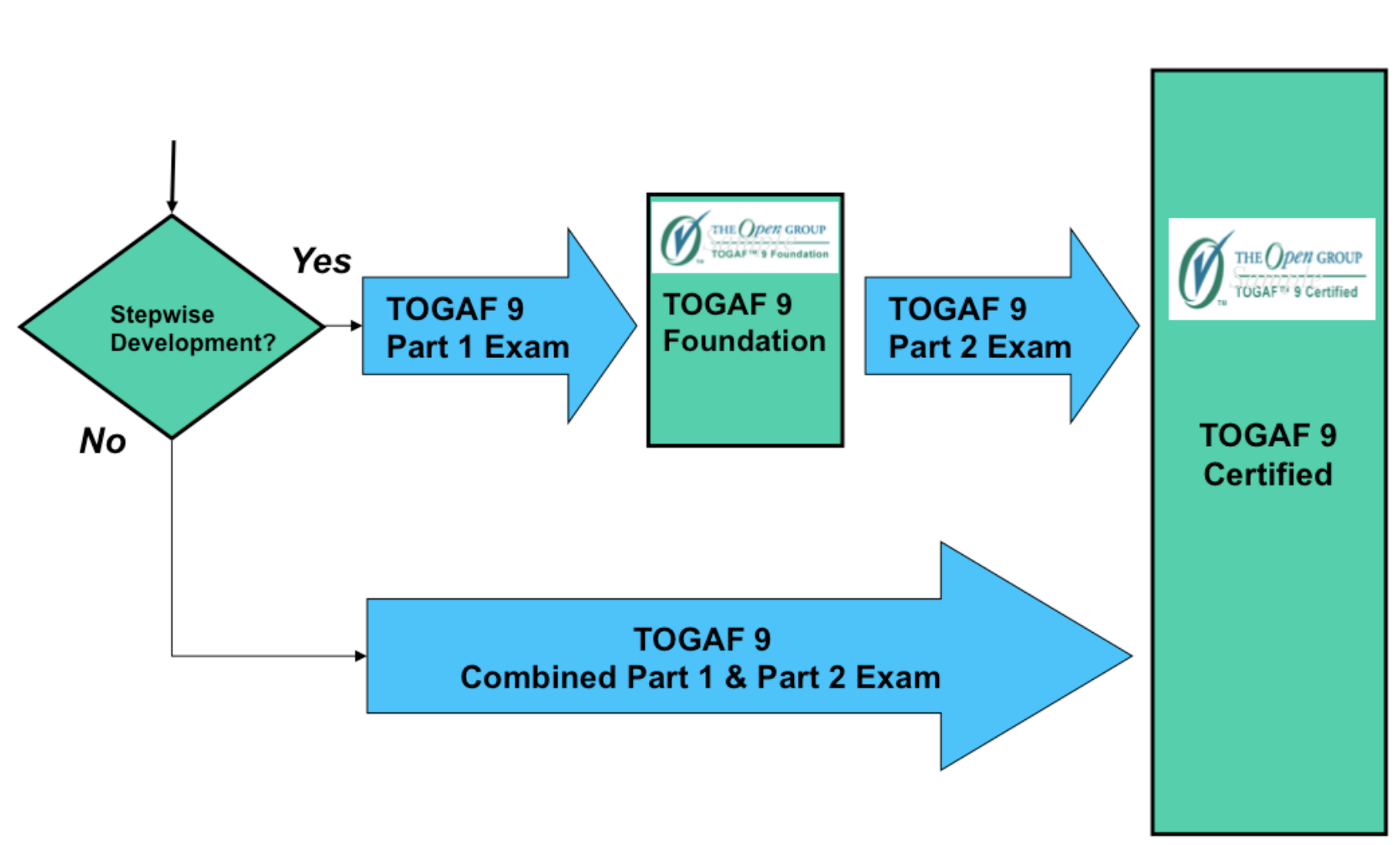
TOGAF certification steps from The Open Group website.
I always have concerns when it comes to frameworks (TOGAF, ITIL, etc) that introduce process and structure but I do see it as an unnecessary evil (as long as you don’t go overboard), especially in today’s world when we have the Internet of Things and different cloud environments radically expanding the capabilities of both IT and the business. The TOGAF framework does a good job at keeping both the business and IT operations in sync using the ADM as business goals are introduced and grow. Think of the ADM as almost like an extension of the project management process. (highly simplistic and incorrect description but hey)
So who is TOGAF for? Well, if you want to connect more with the business side of your company I recommend taking a hard look at TOGAF. This exam is definitely not on the technical side of the house but more so how you can further integrate the IS/IT projects with your business. As projects progress the ADM framework helps to ensure the work stays in-sync with what the business goals is/are. TOGAF ADM below:

TOGAF ADM, from The Open Group website.
However, I won’t be diving into the details about the ADM on this post. Maybe in a future post. Now, I am back off to the drawing board and see which certification is next of my chopping block. I do need to see how my Cisco certifications will transition to the new schema, if you have heard the certification from Cisco Live last June I recommend you give it a run through. Till next next my friends, happy studying!
Wireshark 3.0 Released
Recently, Wireshark dropped a major release which adds a few cool features (some new and some old). However outside of the new features, there is one major under the hood change this feature introduces. WireShark v3 for Windows now ships with Npcap as opposed to Winpcap that we have been used forever now. Npcap is actually part of the NMAP project which while Npcap is build of Winpcap Npcap gets a little more love in regards to up updates and being actively worked on. A while back I did a look at how Winpcap interacts with the NIC cards and captures packets, Even though Npcap is based off Winpcap I am curious to see if that underlying interaction has changed (more to come on that, or I’ll just update this blog post later on with my findings)
A few other features:
- IP Mapping has returned
- Monitor mode support for Windows wireless analysis. This is a huge one in my book, this functionality was brought over from the Npcap change.
- A few other random tidbit, bootp dissector is getting renamed to dhcp. Similar to SSL getting renamed to TLS.
- ciscodump now supports a proxy connection, I am going to need to check this out, as ciscodump utilizes the Cisco EPC capability. Which apparently I haven’t got to kick the tires on just yet. So, I think I am late to the game on this one, but proxy supports make this easier for some environments.
- There are quite a bit more changes, many new protocols were added and well as even protocols were updated.
For the sake of brevity I don’t to cover everything, just a few of the pieces are find more interesting and useful.
Link to the Wireshark release notes page.
The -B Domain for Cisco Access Points
I know I am a few months late on this one, but figured it would be worth throwing out there. Earlier in the year Cisco updated and released its access points to be compliant with -B domain regulations set forth by the FCC in North America. After May 1st 2016, all Access points ordered and shipped will compliant with the -B domain, meaning you will not be receiving any access points that are part of the -A domain. This might not seem like a big deal however depending on what version of code you are running on your controller, you might find yourself wondering why your new -B domain compliant access point is not joining your wireless controller.
Depending on which software Rev you are running, you may or may not meet the minimum software requirements. This will require you to upgrade the code on your controller before you can actually use these new -B compliant access in your network.
- IOS-XE 3.6.XE
- 8.3.102
- Post v8.2 MR3
The -B domain conveys the following changes:
- UNII-1 is allowed for outdoor use. Originally this part of the 5Ghz band was only regulated to indoor use.
- Something to keep in mind when the CWNP updates its exam syllabus.
- UNII-1 is now allowed to transmit power of 1W for both indoor and outdoor use.
- However restrictions have been put on the EIRP when used outdoor with a 30 degree horizon.
- New Spectrum density for the UNII-3 bands.
- Re-opening on Channels 120, 124, & 128 with the restrictions of new testing requirements.
- This is where things get interesting, as the access are supposed to watch out for other TWDR (Terminal Weather Doppler Radar) signals to avoid interference. So we will see how this goes. However this could provide us some much needed spectrum space in the 5GHz band with 802.11ac creating wider channels.
- Remember to make sure you clients will operate on these channels before enabling them.

Sample ordering info for the new -B domain compliant access points.
SourceFire & AMP showing up on CCNP: Security
Looks like the SITCS Exam, that is part of the CCNP: Security exam is going from v1.0 to v1.5. SITCS is the exam oriented around ‘Implementing Cisco Threat Control Soluation’. Now, it only makes sense as the original version of this exam was more geared towards Cisco IPS & CX which has since been EoX’ed some time ago. If you have been studying for your CCNP: Security and are getting ready for SITCS v1.0 exam you still have time, Cisco kept the original exam available till December 31st of 2016 so you have until the end of year.
Cisco has published a dedicated PDF regarding the charges between the exams, which can be found here.
In a nutshell though:
- EoX – Cisco IPS and CX software have been removed.
- SourceFire & AMP Software has been added in as the replacement topics.
- The exam code will be changed to 300-210 from 300-207
In my opinion, SourceFire documentation is still a little scarce even nowadays (Finding the proper version of User Agent on Cisco.com is still a bit of scavenger hunt) but hopefully this push for SourceFire knowledge will change that! (In the meantime I highly recommend checking out CiscLive365 and going through the available sessions, small collection here but it has not updated since Cisco Live 2016.)
As always, happy hunti…I mean studying!
Wireshark Tid-bit: De-crypt SNMPv3 in Wireshark
I recently found myself troubleshooting some SNMP connectivity between a particular set of devices and an NMS. Connectivity did not appear to be the problem as IP Connectivity was there and MIB walks were successful, however some interesting errors were still getting reported on the NMS. As I captured the packets to verify this connectivity, I said to myself ‘If only I can see what the NMS was asking for specifically and what device in question was replying back with’. This led me to check out the SNMP protocol settings in Wireshark, I mean Wireshark can de-crypt HTTPS traffic (with the private key) and wireless WPA traffic surely it can de-crypt SNMPv3. Behold it was true!! I was able to de-crypt SNMPv3 packets, and see what was really going on.
To add SNMPv3 information into Wireshark:
Access your Wireshark preferences: Edit -> Preferences -> Protocols -> SNMP

Where you see ‘Users table’ choose edit:
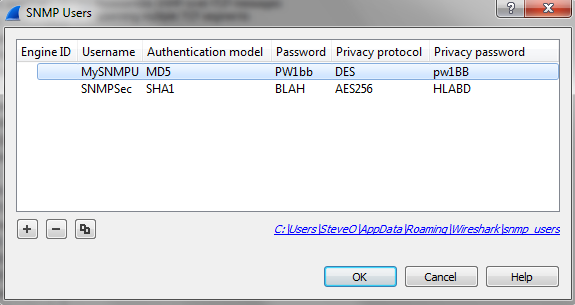
From here we can enter the SNMPv3 settings we need:
- Engine ID
- SNMP USer
- Authentication & Password – MD5 or SHA1
- Privacy & Password- DES, AES-128, AES-192, or AES-256
Once you enter the correct information and choose ‘ok‘ Wireshark will automatically de-crypt any relevant packets.
I feel like this is something I should have known about for a while now, but I supposed I don’t find myself troubleshooting SNMP connectivity too often. Figured I would get the word out there!
Enter the ring: Engineering Deathmatch!!

What happens when you combine the old celebrity deathmatch meets Cisco networking? Well, you get Engineering Deathmatch! Two engineers enter the console and only one gets out! (You’ve seen Tron right!!?)
Well….. it’s almost that dramatic. Have you ever wanted to go head to head against a fellow engineer, put your wits to the test, and see who can fix the network quicker? Engineering Deathmatch let’s you do just that. I went up against Daniel Dib and while I did not arise victorious it was a still a very fun scenario! Major kudos and props to a good friend of mine Jon Major (pun intended) for building out the crazy scenario that had both Dan and myself stumped for quite some time. It certainly wasn’t your typical network mis-configuration.
I really do recommend this deathmatch to anyone looking for a good challenge, regardless of your level (CCNA/CCNP/CCIE) or your networking interest (Collaboration/RouteSwitch/DevOps) there could be a deathmatch with your name on it! Especially if you got a good co-worker, friend, or study buddy who doesn’t mind some friendly competition.
I know I’ve been quiet for a bit lately, but now that I’ve gotten a few things in order I’m coming back!
(Now, to tackle all those drafts that have been piling up)
Till next time, happy hunting.. I mean labbing!


