Wireshark tid-bit: Packets larger than the MTU size.. why, how?
Ever so often when I was doing some packet analysis I would come across systems that were sending packets larger the Ethernet MTU of the segment. Or so I thought those packets were getting transmitted, eventually I finally figured out why I was seeing packets with an increased packet size.
The answer was large segment/send offload (LSO) – When this feature is enabled it is the responsibility of NIC Hardware to chop up the data ensuring why it conforms to the MTU of media/network segment.

Now that we know why we are seeing these large packets, the next part of the question is how are we seeing these large packets in Wireshark. Well, Wireshark relies on WinPCAP or LibPCAP depending on your platform, these two tools capture the packets just before the packets hit the NIC Card and get transferred to the actual network.

The above image is from Winpcap.org, showing the kernel level NPF just above NIC Drive, thus explaining how Wireshark is able to see the larger traffic. Before it hits the NIC Driver and gets segmented due to its LSO capabilities.
Winpcap.org – Winpcap Internals
But I’ve got an ‘Excellent Signal’!!?
Ever so often I find myself troubleshooting some type of wireless related issue, and while wireless issue’s vary from
- Slow performance
- Clients can’t connect
- Poor voice performance
- Or even random disconnects, the list is endless.
However one of the common things I hear during the troubleshooting process is without a doubt along the lines of:
“But it says I have an excellent signal with five bars!”

And…. my favorite question in response to that statement is:
“What is your data rate?” (usually with this same expression)

Signal strength is only a small piece to the puzzle what determining whether or not you have a good quality signal strength. The signal strength indicator itself could even be misleading, just because a client is registering ‘5 bars’ with a good RSSI and SNR does not necessarily mean the AP on the other end of the connection is seeing a similar RSSI & SNR to the WLAN Client. Do I hear a transmit power mismatch, or a highly reflected RF environment?
Nowadays WLAN clients comes in all shapes and sizes (Phones, Tablets, wireless scanners, VoIP handsets) long gone are the days of wireless is just for laptops. With this wide array of hardware clients, you can guarantee each of these devices have a wireless transmitter with different specifications, and while it is impossible to take into account every WLAN client, the client audience should be considered when designing a WLAN or deploying AP’s.
Consider the an access point is transmitting at it’s max power rating, you can guarantee the wireless phone or VoIP handset does not have that same power level. It’s like two people trying to communicate with each other that across a football field and only one person has a mega-phone. The other guy without the megaphone will need to probably repeat himself a few times for the other person to understand him (Think of that as Data Retries).
One of the better ways to identify a proper Wireless connection would be to verify the the data rate, and see review the data rate statistics. Many of the different WLAN Client software have this functionality, telling us what percentage of the data was transmitted/received at a specific data rate. Now shifting data rates is common in a WLAN, but seeing 90% of data operating at the 1, 2, or 5.5 Mbps data rate is just poor performance.
A while back I posted about Understanding a wireless connection, and I wanted to dive a bit deeper and expand on the concept (albeit years later, but hey better late then never right?)
End-Of-Sale date announced for various Cisco IPS’s
Since Cisco started announcing the Sourcefire FirePower (Hardware & Software) modules earlier this year I have been wondering what was going to happen to their existing IPS line. Looks like the End Of Sale announcement was recently made, with an EoS date in April of next year.

The EoX announce affects both the IPS Modules and IPS 4xxx sensor platforms. IOS IPS will remain available, but I do wonder for how long?
This will be an interesting shift for those of us that have used the original Cisco IPS software for a long time now. As we know there is more that goes into this than just buying a module or IPS Appliance. we will also need a central management server to quickly and easily manage these types of devices. Monitoring signature updates and keeping singatures in-sync company wide can be a massive problem if you don’t have it under your thumb. So far I have not seen any support added for SourceFire in Cisco Security Manager, so FireSIGHT will be the way to go.
I wonder if anything will happen to the CX Modules, since they ran their own Next-Generation IPS Signature set. Time will tell I suppose.
Monitoring OTV – Overlay Transport Virtualization
If there is anything I find more enjoyable then doing some type of network design or writing on whiteboard, it’s thinking about network management and creating some new alert or poller that let’s me know when something changes that shouldn’t. It would seem over the last few years Data Center technologies have really become popular:
- Leaf/Spine models – A scalable growth model
- Virtual Switches – VMWare NSX / Cisco Nexus 1000v, ASA1000v, VSG, etc
- vPC – Active/Active forwarding to trick spanning-tree
- OTV – another way to extend Layer-2 connectivity across physical locations
And one the thoughts I have in the back of my mind:
Yea, this stuff is great but I can’t monitor this stuff natively in my management systems. How I am going to know when something goes wrong?
Now, from here I am going to focus on Overlay Transport Virtualization (OTV)
Luckily, Cisco publishes a lot of their MIB structures. For example we can find the OTV MIB File here, this gives us a lot of information and tells us what information is exposed via SNMP.
The first thing, this tells us is where to find the OTV information
1.3.6.1.4.1.9.9.810
One thing I want to point out is the fact, I was unable this find this using a MIB Browser, “810” just was not listed. In order to find this I had download all the SNMP MIB Tables from one my OTV VDC’s. At this point I am not sure if it was an issue with the SNMP MIB Browser I was using or if it is an NX-OS thing.
Now, we will want to take a deeper look at what CISCO-OTV-MIB can tell us. We can find this info here.
That might look a little intimidating and it may look like a lot of reading but luckily it is to the point and tells us the following:
- What OID’s (Object Identifiers) are available
- What each OIDs is with a proper description
- The OID Syntax or variable type (IE: Gauge, Interger, String, etc)
- What possible values the OIDs can return and the meaning of those returned values.
For example:
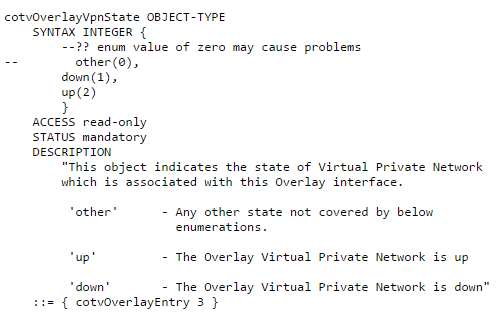
The above snippet from the CISCO-OTV-MIB structures tells us, cotvOverlayVpnState is an Interger and will return a value of 0, 1, or 2 where:
- 0 = Other
- 1 = Down
- 2 = Up
So this tells us, if this specific OID returns a value of 1 we have problem our OTV Overlay interface is down.
We can even go another step further and poll an additional OID to identify the reason the Overlay interface.

cotvOverlayVpnDownReason is another Integer, they will return a value of 0-19 depending on the specific reason regarding why the Overlay is down , the MIB file goes further and describes each of the down reasons. (Small snippet below)

Now, by polling for these specific OID’s in your Network Management Server (NMS) you can much easily get the status of your OTV Overlay interface, and if the Overlay does happen to be down you can also find out why just as quick.
In the event you have multiple OTV Overlays running, you can poll this information on an overlay by overlay basis. If we go up a level in the MIB file, we’ll notice it contains a sequence for each OTV Overlay:

And within each sequence is where can find a lot of the information we probably need:
- The name of the Overlay
- The state / status of the Overlay
- The reason the Overlay is down
- Much more
Now, that we know how to monitor the Overlay interface that really solves half the problem in my mind. We may also want to monitor OTV Adjacencies, or an AED Status. Information that is also contained in the MIB file to poll the additional data.
Another important thing that may be worth monitoring depending on your deployment is multicast. I’ll cover multicast monitoring in a future post, but if your running OTV in multicast mode and you start losing PIM neighbors or mroutes start getting pruned you may definitely have some issues going on.
Let’s look at: UCS B-Series Blade to IOM Connectivity
Being a network engineer one of the things that I really wondered about in the UCS B Series was how exactly do those server blades talk the IOM, now from the IOM to the FI’s its relatively simple you’ve got physical cables. However within the UCS B-Series chassis there are no cable per-say within the chassis however the blades are connected by an 802.3kr Backplane Ethernet.
There are actually a few things that come into play when considering the bandwidth/connectivity between the blades in the B-Chassis such as:
- IOM Model -2104XP vs 2204XP vs 2208XP and so forth
- The IOM Model depicts the following:
- Number of Physical connection to the upstream FI
- Amount of Throughput that can be carried through the chassis
- Number of 10Gb IEEE 802.3kr connection into the Chassis
- The IOM Model depicts the following:
- Adapter Type – Cisco VIC 1240/1280 vs M81KR vs 3rd Party Cisco Certified Adapter vs etc
- Affect the number of virtual interfaces
- Determines the amount of throughput per-fabric to/from the server
- Number of adapters populated in the blades
- Also determines the amount of throughput per fabric.
A physical representation of the connectivity:

I was able to get this info from Cisco.com, and this page has goes into detail regarding many of the different types of connectivity. It is definitely a good reference for planning out a UCS-B Series deployment. Granted this is only in regards to network connectivity and doesn’t talk about the requirements of the actual compute hardware itself.
P.S. I’ve been updating my CCIE: Data Center Study Link Page hope your still checking out!
CWNP Conference Presentations

If it wasn’t Twitter I probably would not have known there was a CWNP conference going on, but luckily we have Twitter. Looks like it was a 3-day conference about all things wireless, I really will try and go next year.
It also looks like they posted the presentations on their website found here, I’ve looked through almost all of the presentations at this point and there are definitely some good ones in there. I hope they take a page from CiscoLive365 and post videos of the actual presentations in the future. Even if there is a small fee they would be worth it (or maybe be available certified CWNP’s?). While you can read through some of the presentations and get some valuable information from them, there are one or two that would probably offer much more insight if you could see/hear the presentation.
I really like Jerome Henry’s presentation on WLAN ‘range’, because believe it or not there are still quite a few people out there that say ‘This AP can cover 1500 sq. ft’, sure maybe it can but what will data rate be and will clients transmission be able to make it back to the AP when they start approaching the edge of the wireless cell?
Jonathan Linton’s VoWLAN, is another good one going over some best practices and design considerations.
There is also a good one on Transmit Beamforming, now I don’t want to re-type the entire page up so go check it out!

 CCIE or Null!