Reboot & update your router in half the time with warm reloads!
Reloading a router can sometimes feel right like an eternity, usually when you issue a reload you can step away get a cup of coffee sit back down and the router should be just about be ready. For quite a while now (well since before 12.4 which lets admit is a long time ago) we’ve had to ability to ‘warm’ boot Cisco routers and cut the reload time in half! The first question we probably ask, is what exactly does the router do differently to decrease the time it takes to reload? Well, When you want a router boot, what is one of the first things you see it doing? Usually you see the router reading the flash card, grabbing the IOS and decompressing it into RAM, when you enable the warm reload feature the router skips this steps because it keeps this information in a reserved portion of memory.
This was the best graphic I could that provides a visual explanation of the process. A powerpoint from Cisco in 2004:

Showing the a warm reload skipping the load & decompress process and starting right at the initialization process.
What’s even better about this feature, is how easy it is configure. This feature is enabled with a single command:

There a few caveats you want to keep in mind when configuring this command:
- As mentioned after the initial configuration of the warm reload you need to initiate another reload of the router before the feature really becomes active.
- The count is the number of times you can perform a warm reload before you must perform another cold boot.
- uptime is the amount of time the router must online in between warm reloads this means you can sit back and continuously warm reload a router as soon as it becomes available.
- When you want to perform a warm reload you must specify the keyword warm after the reload command. (see example below)
You can verify the configuration with show warm-reboot:

Prior to reload after configuration
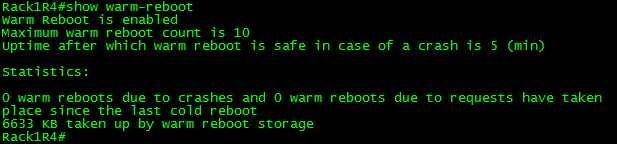
After the reload once the feature is enabled.
Performing a warm reload:

Don’t the keyword ‘warm’
This was the initial reload:

Reboot took 170 seconds!
Almost 3 minutes!
This was a warm reload:

1 minute & 10 seconds! Much quicker!
Now, what I think the best part of this feature is, is the fact we can use warm reloads to stage IOS updates, because let’s face it how many often do we decide to just randomly reboot Cisco routers! This process works in a similar fashion, the router will actually load & decompress the new image prior to going down, saving time.

This is done with the following command:
-Unfortunately I was unable to successfully do this, looks like more trusty old 1841 just couldn’t do it with IOS v15.

Now, if only we could get this feature in NX-OS, when you reboot a Nexus you can forget about the coffee, hop in the car and get a pour-over from Starbucks come back, and you might still be waiting.
Network Management a forgotten art? Part 2!

A while back I wrote a quick article about network management and tools you can rely on. As you could imagine network management is a quite a broad topic and definitely one definitely can talk about till I turn blue. So I figured I would throw out some other interesting considerations when dealing with Network Monitoring.
- The location of the NMS or more particularly the device that performs the device polling. When you get into larger networks and more robust network monitoring applications (Nagios & SolarWinds for example) you can expand into a distributed model. That distributed model sounds awesome at first but there could be some interesting caveats with this approach.
- The location of that distributed poller, did I say that twice? Why is the location important though? Well any health statistics gathered from the poller will be reported in the NMS from the perspecitve of the poller. At that point you must ask yourself is that information valuable, and does that provide the level of monitoring you are expecting to capture?
- Running a networking monitoring system in a distributed model creates additional overhead and requires more upkeep to simply monitor and maintain the NMS itself. On top of verifying the health of the network/systems/services in your environment you also need to account for the health of the distributed pollers as well.
- Are you putting an additional load on the monitored devices? Believe it or not but monitoring a device via SNMP can actually create issues. A device might be susceptible to a software caveat/bug when certain processes are monitor or polled. When polling a device; that monitored device must process and respond to a number of different SNMP Get request you definitely want to make sure the other more important devices functions/process are not hindered as the device process SNMP data from the process/control-plane perspective.
- Consider the additional load of monitored services. In my first post I mentioned monitors tools such as Syslog, NetFlow & IP SLA’s depending on the environment it may worth considering the amount of traffic those tools can generate sure from a dozen devices it might not add up much but what if you had hundreds of devices at that point syslog messages from a few hundred device might become a bit overwhelming. In some cases management related traffic might need to be marked down in QoS policies to avoid management traffic affecting the production traffic of your network.
- Polling Intervals, this is an easy one to overlook but an extremely important factor to take into account. It may take some time to find that sweet spot but:
- Poll a device too aggressively and you risk creating false alarms.
- Poll a device too infrequently and you risk missing important events in the network and/or network outages.
- A ‘very aggressive’ polling interval may also crash the NMS application itself, remember at the end of the day these are simple applications running some type of database on the back-end with limitations.
- Understand the data that the NMS is presenting to you. Anyone can open a web browser and look at a nice fancy but what does that fancy graph really tells us? Let’s say your NMS calculates latency and response time, well how does it do that? Is it polling a particular OID or is it simply pinging the device and looking at the response time, and if so how often does it issue that ping? The same can be asked with interface utilization graph, is it simply grabbing the Rxload/TxLoad statistics from the specific interfaces at a set point or are other tools like NetFlow taken into account? The more you know about how your NMS works the easier and quicker it will be for you to interpret, analyze, and diagnose issued presented to you via your NMS.
Why Cisco Live is awesome!
Having just got back from my second Cisco Live, I couldn’t help but think about what an amazing event it really is. After all 7+ hours on a plane provided me A LOT of time to think. (Now, If only I thought about typing up this blog post on the plane instead of just thinking about it)
I can sum up how awesome the event was in 2 words ‘The Social Hub’ & the ‘The Tweet Up’ (ok, well maybe that was more than 2 words)!! From the second I walked back into the Social Hub I was greeted by some familiar faces who remembered me from last year! Which I think was the best part, flying out all the way to west coast (from east coast) it was great knowing more than a few people in a new place. Not to mention from what I remember about the Tweet-up and Social Hub last year, it has grown quite a bit! I also got to take part in Tech Field Day, which was awesome. Although it was my first Tech Field Day and I relatively quiet since I wanted to see how they play out. Hopefully I get invited to another at the next Cisco Live. I’ll definitely participate more.
It’s also a great spot to talk shop with many of networking professionals from around the world that I probably would not have met otherwise! I also had to chance to speak with Ethan Banks from Packet Pushers, Ron Fuller from Cisco, Keith Barker & Scott Morris from CBT Nuggets, Brian McGahan and Mark Snow from INE! I’ll admit I was a little star struck since these are some of the people I’ve followed and learned from over the years. Even with four days of Cisco Live there were still a few bloggers and twitter’ers I did not get to meet but definitely next year!
A few other reasons Cisco Live is awesome:
- Testing Center – Half off exams, what more can I say! This year I was able to knock out the 642-996 & the 640-911, wanted to finish off the CCNA: DC but didn’t have enough time. I guess two exams in four days is still pretty good.
- Cisco Store – Easy way to pick up some cool Cisco merchandise or Cisco Press books. I just wish they had a better discount on the CiscoPress books during Cisco Live.
- The TAC ‘Walk-In Clinic’ – Somewhere you go to bounce ideas off Cisco TAC in person. I probably spent at least an hour (or two) here during both Cisco Live’s just to discuss certain situations I have seen in production and what their thoughts were.
- World Of Solutions – While is this usually a giant exhibition center, it is very easy to get a lot of useful information from here. For one, there are a lot of Cisco technologies on display with employees ready to show you have they work and go through some demo’s. Everything from the Virtual NAM’s to some of the newer SourceFire technologies. Not to mention it is easy enough to ask some of the top vendors how their products work
- The sessions – These are a given, the technical sessions are truly amazing going into great technical detail and provide you the ability to ask questions throughout the session!
- There are many more reasons I did even mention.

First Tweet-up Photo
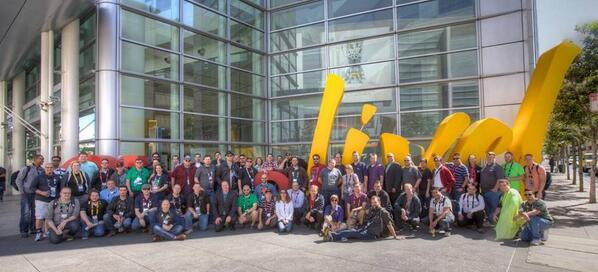
Final Group Photo @ the sign. (Which you can barely see half of)
Another great 802.11ac video from CWNP.
CWNP has posted a new 802.11ac video over on their YouTube Channel (CWNPTV)
This new video covers Planning for 802.11ac, if you still have not had a chance to go through the IEEE document or mess around with any new 802.11ac equipment this video is worth a play through. It covers the common pitfall of coverage vs capacity (Which does not only pertain to 802.11ac). I’ve seen many places and people simply deploy wireless based on signal strength, and if you have done more than a few wireless deployments you know signal strength & coverage is only half the battle. Capacity and throughput is the other half.
The video was posted almost a week ago and still has less than 200 views, so I am just trying to spread the word. As there are a few other useful videos in that Youtube channel, it’s a worthy resource that should not be overlooked for anyone wanting to be more familiar with 802.11 Wireless.
CCNP: Security Finally!

And the race is over, last week I passed the SECURE exam finishing off my CCNP: Security, barely 2 weeks before retirement. I feel bad for coming so close to the wire with this one. Considering I passed FIREWALL over a year ago and VPN sometime last year, however it has been a busy year. Now, that I have finally finished off CCNP: Security it’s time to get back to Data Center. Let’s see if I can finish off my CCNA/P: Data Center off this year to!
New page is up, CCIE: Data Center study links.
Well it has been a crazy week for me and unfortunately I have not even had the time to put together a proper blog post.
To keep the information flowing I have added a new page to my blog “CCIE Data Center Study Links“. For the last 9 months or so I have been very data center focused, and I am planning on tackling the CCNP: Data Center certification soon (Probably going to be taking one those exams at Live this year). During that time I’ve gathered quite the collection of links & videos for data center material. Recently, I thought to myself instead of keeping this information locked in my own Evernote account I should move this to the blog. So there it is!
So far I have only been able to consolidate some of the Nexus material I’ve used, the new CCIE Data Center Study Links page will continuously be updated. (So keep checking back!)

 CCIE or Null!