Configuring a SPAN session.
A SPAN session is a way for you to have the traffic that is transmitted and/or received from one port or VLAN and have it forwarded out another port for analysis purposes. It’s very easily configured by a few small statements and the only thing you have to decide on is which port you want to monitor, the traffic flow you want to see from that port (egress, ingress, or both) and the destination port you want the traffic sent to. (See the configuration below)
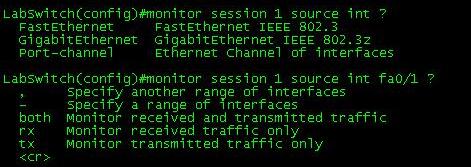

Note: For this local SPAN session both the source port and destination port must be on the same switch. RSPAN allows SPAN sessions across remote switches, but I will not be covering RSPAN in this post.
Their isn’t much to consider concerning the source port since it will not be effected at all, the destination port however is treated a bit differently. First off the destination port will be put in a “Monitor” mode, meaning traffic received on this port will be dropped. Only traffic from the source port will be transmitted out of the destination port by the switch that’s it.

You can issue the sh monitor session # command to see if their are any active SPAN sessions on the switch, or if you want to see the details of a configured SPAN session. The source port (fa0/1), traffic flow (both), destination port (fa0/2), and the encapsulation, are all shown in the command. To close down a SPAN session simply issue the no monitor session # command.


Now your next question might be, what are you going to use this for or why are you going analyze the traffic? Well, if the station at the destination port is running Wireshark, it’s a real easy way to get a glimpse at the traffic traversing your network. From their you can look through the data and see if anything sticks out. Alternatively you can have a SPAN session provide data to a IDS/IPS system so it can monitor your network for any abnormalities.
Cisco WLC Interfaces.
If you have ever worked with a Cisco WLC or have looked through any configurations for a WLC, then you have no doubt seen the interfaces that make it work. You’ve probably also seen that diagram concerning how these interfaces relate to the physical interfaces on a Cisco WLC.

Now their are only five different types of interfaces (Management, AP-Manager, Virtual, Service-Port, and Dynamic Interfaces), I figured I would just take some time to quickly touch on them.
- Management Interface – As you can suspect this interface is for in-band management and handles any communication with AAA servers. This interface will also handle the layer 2 communication between the controller and any APs. Needless to say the configuration of this interface is mandatory and can not be skipped.
- AP-Manager – If you want to have APs on different subnets other then the subnet the WLC is on then this interface must be configured, it’s a requirement for Layer 3 LWAPP transport mode. So as you would suspect this interface handles all layer 3 traffic between the WLC and the APs. Since higher end WLCs can have multiple AP-Managers only 1 AP-Manager interface can be configured per physical port.
- Virtual Interface – Another mandatory interface that must be configured (once again like the management interface you don’t get the option to skip the configuration of this interface). This interface handles any mobility management, VPN Termination, Web authentication, and is also a DHCP relay for WLAN clients. You really want to give this interface a bogus type address (Like 1.1.1.1 or something) since it’s only accessed and used by the WLC, the APs and WLAN clients will not interact with this interface. (Other then it’s purpose as the DHCP relay, but it’s all in done within the controller unknown to the AP’s or clients)
- Service-Port – This is also a physical port for out of band management, so it’s configuration is optional. The port doesn’t even support 802.1Q, so you can’t use it for anything other then accessing the controller. (Note: This is only physical port that is active while the controller is booting)
- Dynamic Interface – Now these are the interfaces you can create and use to link specific SSID’s to specific VLAN’s on the wire. So this is where and how you can separate your wireless client traffic, this interface will also double as the DHCP relay for it’s subnet/VLAN (Note: A WLC can have up to 512 dynamic interfaces)
How can you build a better network?
Often enough network engineers will be called upon to setup a network from the ground up. Whether it be a new branch office or a data center redesign it will be up to you to think up an efficient network design that can also be incorporated into the existing network seamlessly. Now depending on the size of the network that can be a daunting task, other times it could just be a simple ISR with an etherswitch module inside.
When you have to consider VLANs, Spanning-Tree, IP Addressing, Security, QoS, VoIP, Security, L3 redundancy, WAN connections, hardware models, software version, and the list goes on daunting at first yes? Cisco does have ample resources out there to aid you in your task of designing Cisco networks who would have thought?
One of the best resources I’ve found is the Cisco Design Zone this great website holds design details based on Technology, Industry, and architecture. While some of the guides can be quite large they go into very fine detail. The guides define advantages about using specific Cisco router or switch models along with sample configurations (best part in my opinion, seeing how it’s done) and some of the sample configurations have very convenient comments explaining the important points of the configurations. To sweeten the deal even more some of the guides show how the design correlates with Cisco’s SONA model which just adds volumes of worth while knowledge.

Addition resources can be found by looking at the Cisco design certification track the CCDA & CCDP programs have certification prep books from Cisco Press. They offer some great reference on best practice methodology concerning network design. The PPDIOO design model is also a good principle to abide by.
 This PPDIOO design model is covered in great detail in the design track so if it’s something that interests you I would definitely pick up one of those books. (Just watch and make sure you get the book that correlates with the current exam version if you are planning to take the certification exam)
The last little piece I want to show is Cisco’s Campus Design model, it’s a nice extension of Cisco’s hierarchical model that’s shown in the CCNA track. (And once again, most if not all of the guides in the Design Zone will incorporate this model into the design)
 You can still see the Core, Distribution, and Access layers but you can also see the addition of many other layers a WAN layer for branch office connectivity, Internet layer, E-Commerce layer concerning where the rest of the world interacts with your companies public facing services, along with a few others. It breaks down any complicated network into a structured module portioning out where each device belongs.
Now i’ve barely scratched the surface of Cisco’s network design concepts but if you want to see more definitely put the CDDA/CCDP books in your reading list, along with some guides from the Cisco Design Zone.
Secure Cisco Device Management.
One thing that should be standard in your setup, is secure management. Being a network engineer requires you to secure your management interfaces, whether the management interface is a web page or remote CLI session, it should be encrypted and authenticated. After all configuring port security and firewalls are useless if your administrative credentials are sniffed off the network in clear text, or worst case your entire configuration.
First thing you want to do is activate the secure protocols and disable the weak protocols. So we would issue the following commands:

As you can see we first disabled the HTTP protocol, and then enabled HTTPS (Note: the first time you enable HTTPS a certificate may be generated), then configured the vty lines to accept only SSH, and not telnet connections.
Note: Prior to disabling telnet and enabling SSH, you want to configure the aaa new-model parameters along with any local users DB entries. See this Cisco guide for configuring SSH in more detail. Last thing you want to do is lose remote access to your device.
Now this device can only be managed via HTTPS or SSH, telnet and HTTP access have been disabled. This will prevent the administrative credentials of your network devices from being sniffed off the network in clear text, only encrypted cipher text will be found.
Just to push the point home some more, here is a TCP stream where I telnetted into a lab switch and issued the sh run command. First off you see the password I entered to access the switch and secondly the entire output of the sh run command is right there in clear text!
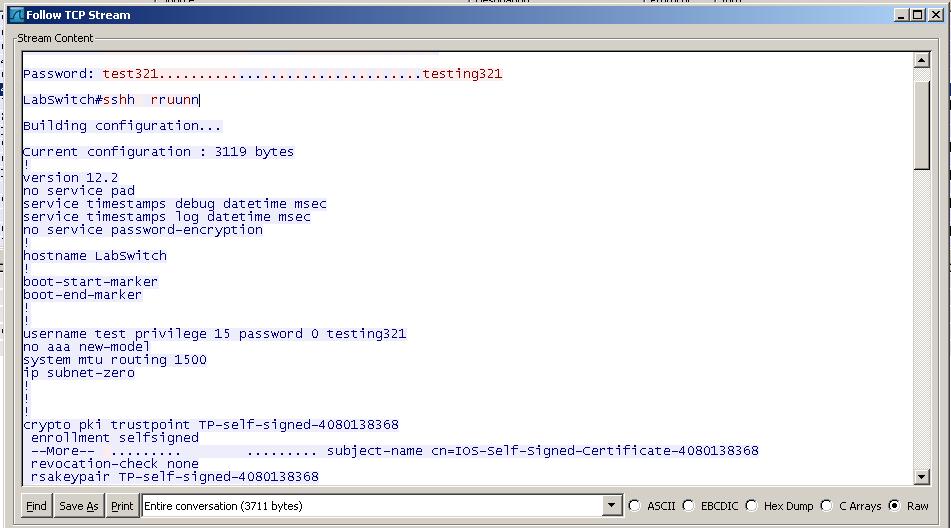
Now, I did a second capture where I accessed the switch via SSH and issued the same commands.

Very different output, as you can see, in the beginning you see I used Putty after that the encryption algorithm exchange and the rest is cipher text.
You can also verify this by using NMAP to perform a port scan on the device to see what ports the device is listening on.
Here is a NMAP Scan with all four protocols enabled (Telnet, SSH, HTTP, and HTTPS)
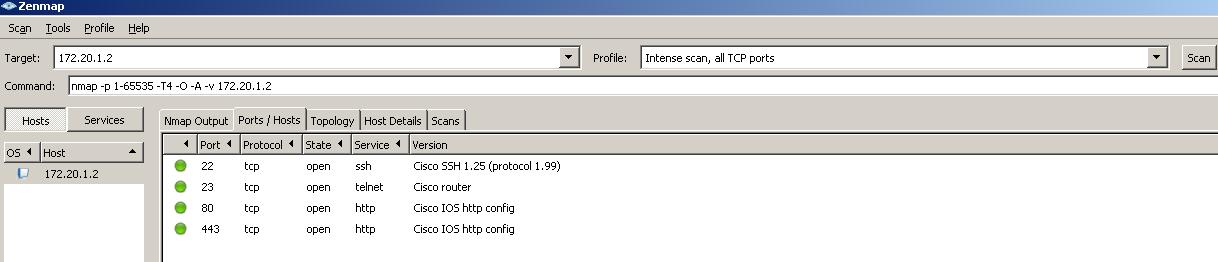
Here you can see, the lab switch is listening on all four ports, so individuals can connect to this device in an insecure manner. (The option should not even be out there)
Now a second NMAP scan after the commands shown above were entered.

Now the device is only listening on 22 and 443. This device can only be managed in a secure way.
I’ll end this on a final note… The tools I used here are all free to download NMAP, WireShark, and Putty. So it doesn’t take much for some barely knowledgeable (and bored) user on your network to start sniffing packets on your network.
Let’s look at: Cisco Discovery Protocol (CDP)
Yes, yes I know if you have ever worked or studied Cisco on any level you will already be aware of Cisco Discovery Protocol (CDP), and what it is and does. I just wanted to take the time and cover it for some of it’s finer points. While I know talking about CDP is a jump from previous articles, but I was using Wireshark recently and caught a glimpse of a few CDP frames crossing my network.
Now if you ever have to map out an all Cisco network then CDP in your road map, CDP will guide you to any neighboring Cisco devices providing you the below information:

Just look at that, the only thing it doesn’t give you is the amount the memory and flash in the neighboring device, so this also an easy way to inventory your network and see what devices are connected where and what IOS is running on that device.
To see this information from within a Cisco device you want to issue the sh cdp neighbors command

The output can easily be matched with the table posted above. Additionally you can issue the sh cdp neighbors detail command to go an addition step further and get the actual IOS version running the on the neighboring devices.

Along with the IOS version, addition details about the connected interfaces, and platform are displayed. So if you were in the process of mapping or auditing a network with only the tools available CDP is one that should never be overlooked.
Another thing to consider is which version of CDP is running on your Cisco devices, the screen shots above are both from devices running CDP versions 2. Obviously version 2 has a few additions that version 1 did not have, let’s compare the two shall we.
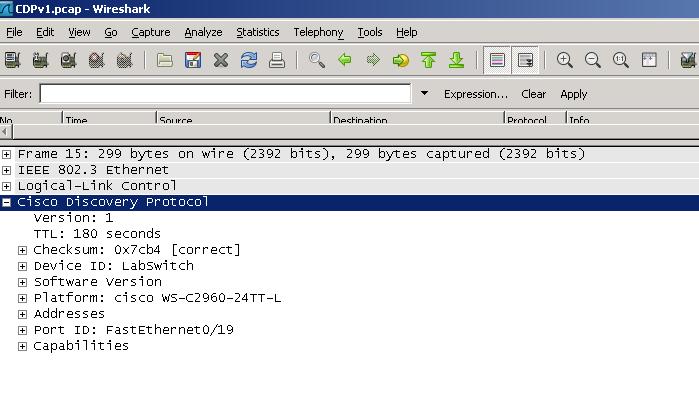

As you can see version 2 offers improvements with PoE negotiation, which is used with other Cisco devices (VoIP phones, and Cisco AP’s), as well as duplex settings, the native VLAN of the line, and the VTP management domain information.
The last thing I want to mention is the CDP packets I sniffed off my lab can be sniffed from any Cisco device if CDP is running on the interface, which can be security risk especially on edge devices. So on any edge devices or devices that do not have any other neighboring Cisco devices then you might as well disable CDP on the device, see my previous post concerning the 1-step router lockdown, concerning some basic security practices.
My thoughts on the CWTS exam from CWNP.
Last week I went ahead and took the CWTS (Certified Wireless Technical Specialist) exam from the CWNP group, now I know they consider this almost a “sales” certification but I wanted to start with this exam just to see how the CWNP group present their exams compared to Cisco, Microsoft, RIM, and CompTIA. Well I managed to pass the exam with a 90% (70% is the minimum score required to pass) so I did fairly well on the exam. I did think a few of the questions were not worded in the best way, but it appears I understood what they were asking for.
My primary sources of study was the Official CWTS study guide from CWNP, along with their practice exams hosted off the CWNP website, not to mention a few years of supporting multiple wireless networks. Now I’m not usually one to say “yea get the official study guide you’ll be ok with that” but in this situation I have to recommend the official study guide. It does an amazing job at covering the CWTS exam objectives. Plus I found it a very easy book to read there plenty of clear concise explanations with enough images that promote the text (Images also span between some of major WLAN equipment vendors Cisco, Proxim, Motorola, etc). The only downside I found concerns the material on the CD that is included with the book. While it does come with sample tests and flash cards I found a few of the questions to be incorrect, another reason to purchase the online practice tests.
Now the material on this exam are the fundamental basics of a WLAN (pertaining to the 802.11 standards, the RF spectrum, and WLAN hardware) and because of that I really do recommend this to any type IT professional who is new to working with WLANs. Whether you are help desk/field technician or even a network administrator that needs to support/implement a new WLAN this book does deserve at least one look over. When I first started working with WLANs I would have loved to have this book it would have saved me hours of research back then. However if you are like me and you have plenty of experience with wireless already I would skip the CWTS and go straight for the CWNA certification.
Now that’s a rap for the CWTS, considering my experience with this exam and the material, I will be pursuing my CWNA certification later on this year but I want to squeeze in a lot of study time for the CCDA exam before Cisco retires the 640-863 April 30th. It’s a certification I tried pursuing a long time ago but just never dedicated that much time to, however between then and now I’ve read many Cisco design guides and both 640-863 Cisco Press books. So if you notice my upcoming entries leaning more towards network design consideration that’s why.

 CCIE or Null!