BGP study notes posted.
I’ve updated my Study Notes page to include my BGP notes. Due to my recent job change I’ve found myself working much more closely with WAN Technologies QoS, BGP, IPSec, MPLS, EIGRP, OSPF Networks. So I figured CCIP level knowledge would very beneficial. My goal to take the BGP+MPLS 642-691 exam within the next month. Then hopefully pass the QoS 642-642 Exam before the end of year. I’m hoping to ring in the new year with a CCIP certification.
I’m using the following resources to study for the BGP+MPLS 642-691 Exam:
- Routing TCP/IP Volume II
- Internet Routing Archtitectures 2nd Edition
- BGP Design and Implementation
- MPLS Fundamentals
Scheduling router jobs utilizing Kron policies.
Another very nifty feature that is part of every router (along with Unix system) is the ability to run and schedule Kron jobs. The next question is what can you use these kron jobs for, well you can use them to run privileged level commands on a scheduled basis.
A few examples:
- Let’s say you want the router to automatically send it’s config to a TFTP or SCP server, create a kron job that will do just that on a weekly basis.
- Create a kron job that will write the running-config to memory so you don’t have to run the risk of losing your current configuration in the event of a power failure or router reboot.
- Set a kron job to run on a nightly basis and issue the undebug all command to prevent someone from letting a debug run rampant.
- The possibilities are almost endless.
Something to keep in mind however is the fact kron jobs cannot be used to make configuration changes, kron cli commands are submitted at the privilege level individually and because they are submitted individually you cannot nest commands to issue commands in global config mode. (You will want to look for a macro for something like that)
Now lets look at what we need to do to create and schedule a kron policy for a Cisco device:
- Create the kron policy.
- set the commands that are to be issued by the kron policy.
- Create the kron occurrence policy.
- Specify the re-occurrence schedule.
- Specify which kron policy to run under the occurrence schedule.

Setting up a kron policy

Setting the kron policy schedule.
The router will also tell you if the clock is not configured, as you could guess if the date/time on the router is not configured correctly scheduling the kron job could be difficult.
You can view the kron schedule by issuing the following command: sh kron schedule

Viewing the kron schedule
I’ve created a second schedule to run every 2 minutes to the sake of my own time.
You can also debug the kron job to verify it is running successfully: debug kron all

Kron debug output.
From the debug output you can see the router call the kron job, issue the command in the kron policy, delay the kron job another 2 minutes, and in this case you can see the router write config to memory.
Securing BGP.
BGP like other routing protocols need to be protected. Remember BGP runs off of TCP port 179 and because of this it is susceptible to the typical vulnerabilities of TCP, but we do have a few options that can be configured to provide some addition security.
1. MD5 Authentication
This should go without explanation like other routing protocols, neighbors will be authenticated using an MD5 key, this key must match on a per neighbor basis.

Configuring BGP Neighbor Authentication

Neighbor with a bad MD5 password
2. bgp maxas-limit
Maxas-limit doesn’t initially appear to apply any real security like the MD5 authentication, but the maxas-limit will prevent your BGP router from accepting routes with an AS-Path longer then the maxas-limit. This can help manage resources and prevent also prevent someone from pre-pending and AS-Path 20 AS’s long, which does not scale very well.
Sidebar history lesson: this feature came about after Cisco supported 4 octet AS numbers in the BGP packet (RFC 4893) because of a DoS vulnerability which has been fixed, but it still good practice to control the resources on your router.

Configuring maxas globally in config-router mode

maxas violation
3. TTL Security
TTL Security allows you to specify the packet TTL to eBGP neighbors, the reason this provides security is because it allows to specify how far away your peer is going to be. This will make it hard for someone to spoof a BGP neighbor that is further away then the configured TTL.

BGP TTL Security Configuration
4. Control Plane Policing – CoPP
Another option is to configure a service policy applied to the control plane so BGP updates are only processes from specific neighbors and not just anyone.

BGP Control Plane Policy
5. Limit the number prefixes you can learn from a neighbor.
This one you have to be careful with because when the prefix limit is reached the neighbor relationship is reset and re-established, obviously this will be production impacting. It can be configured to send a syslog warning message when the maximum prefix limit is reached, however it almost contradicts the purpose of configuring the maximum prefix.

Setting the maximum amount of prefixes BGP can learn from a neighbor
Now those are just a few ways you secure BGP in your network you can also filter BGP prefixes through a prefix-list, filter by ASPATH using regular-expressions, as well as using good old fashioned ACL’s. This Cisco page covers those addition BGP security configurations, and covers the ones I mentioned here.
Blogging for a year now!

Well, I’ve been blogging for a year now. This seems like the perfect time for me to reflect back on the things I’ve done over the last year. The new technologies I’ve learned, my professional and personal accomplishments. In my year of blogging I’ve published 30 articles, and I’ve got 14 articles in my drafts bin so I got a lot more information to get out. When I first started my blog I only had a dozen or so hits, now a year later I’m getting 1200-1500 views a month and for that I just want to say thank you for visiting. I do hope some of my articles have helped you out and provided you with some good information!!
Throughout the course of the last year and my blog, I’ve learned and passed my CWTS, CCDA, and Server+ exams! I was pursuing my CWNA but because I took a new job for a managed services provided designing and managing/maintaining networks around the world I had to withdraw from my CWNA studies, which explains why my last few articles have shifted from WLAN technologies to a more routing nature, I’ve also been diligently studying to acquire my CCIP certification so expect to some more BGP information from me as well some MPLS and QoS material. I also see some IPSec, Firewall, GRE, and other layer three topics showing up here on my blog in the future, so stay tuned for some more good info!
My Top 5 articles:
- Cisco Band Select with 998 views
- Cisco WLC Interfaces with 656 views
- Understand a Wi-Fi Connection with 590 views
- Wireless Networking and the 5 GHz RF Range with 469 views
- Cisco Band Select and Client RSSI with 369 views.
Sincerely,
Steve Occh
Watching BGP neighbors form.
BGP can be considered quite the routing protocol and typically tends to intimidate those that do not fully understand it. So I’m basically going to start from the ground up here and start from the forming of BGP neighbors.
Here is our topology, something nice and simple.
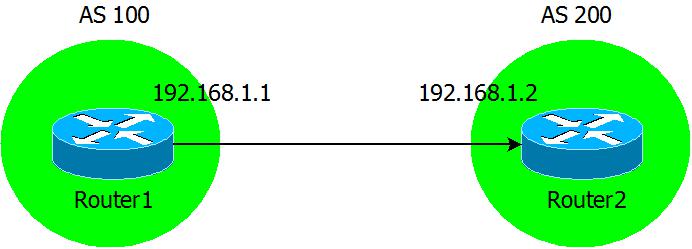
Now we are going to configure the BGP neighbor statements on our two routers.


While I run the debug ip bgp ipv4 unicast command on Router2:

From the debug output we see the two routers form a neighbor relationship as it goes through all of its phases.
- It starts from the Idle state, Idle is the phase that any BGP connection starts.
- Now you see move from Idle to Active in the Active state the BGP device is still trying to setup BGP session with its peer.
- Then you see we go from Active to OpenSent which shows we received a BGP Open message from the peer.
- Now continuing over the next few lines, you see this device sending out its Open message with its BGP version, AS number, and hold time. After that you will see the device receive an Open message from it’s neighbor and acknowledge its neighbor’s BGP capabilities.
- Now third line from the bottom we will see the status go from OpenSent to OpenConfirm, in this phase the BGP peers are simply waiting to receive a keep alive from the other.
- Then almost immediately we go from OpenConfirm to Established, and the BGP neighbor is up.

The different between tracert and traceroute.
The fact that Windows tracert operates differently from the traceroute command in Cisco devices will almost always lead to an interesting discussion. Mainly because many people are not aware of the real differences between these two utilities, they are merely aware of the spelling differences and how could you blame them both commands give you very similar results and perform the same function.
Let’s look at a tracert from a Microsoft Windows workstation:

What to know here is the Window’s tracert utility is relying on ICMP echo requests. (So this is nothing more then an extension of a simple ping)

The other key difference between Windows and Cisco, is when the destination is reached it replies back with an ICMP echo reply:

Now when we look at traceroute utility from a Cisco device:
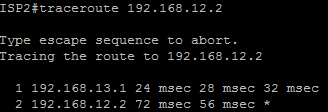
Now the packets:
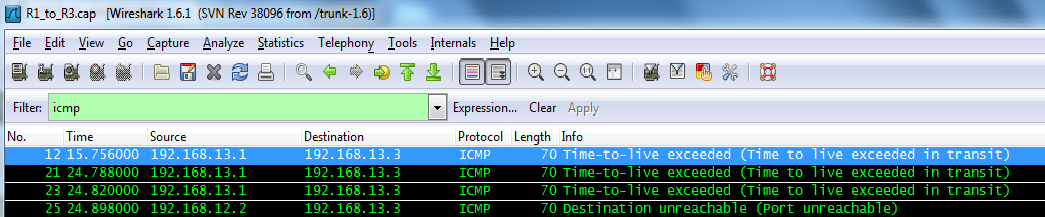
What we see here is a UDP packet with a destination port of 33434 (The source port is almost always random), not an ICMP echo packet.
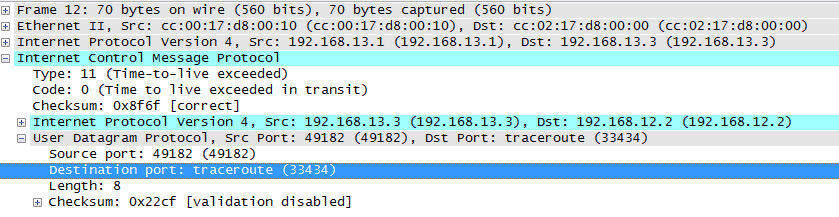
Now with Cisco the destination will not answer back with reply packet but surprising enough a destination unreachable packet. See below (Notice the source of the IP packet, it’s the destination of our traceroute)

So to recap, Windows Tracert utility relies on ICMP Type 8 (Echo Request) and Type 0 (Echo Reply) packets, while Cisco replies on a UDP probe packet with a destination port of 33434, and ICMP Type 3 (Destination Unreachable) packet.

 CCIE or Null!