Archive for the ‘Packet Analysis’ Category
Let’s look at Generic Routing Encapsulation (GRE)
Generic Routing Encapsulation, not much to say about it, its generic right? Well, it’s pretty tough to find a network that does not utilize GRE tunnels in one way, shape, or form. Whether they are Encrypted GRE tunnels or GRE tunnels riding over IPSec tunnels for branch connectivity chances are GRE is being used somewhere in your network. After all GRE provides us with various features that traditional IPSec tunnels do not offer us. Such as allowing multicast traffic to traverse the tunnel providing us scalability with the use of a routing protocol. It provides us these features because of how it interacts with the IP packet, some people refer to GRE as a layer 3.5 protocol because of how it encapsulates the existing layer 3 IP packet.
Below we can see how GRE interacts with the IP packet:

Notice you can see two sets of IP address in that packet, the first set of IP addresses (10.0.0.1 & 10.0.0.2) are the tunnel addresses, the second set of addresses under the GRE header is the real data that was sent through the tunnel, and it’s simple ICMP echo request from 1.1.1.1 to 2.2.2.2.
And for a closer at the fields within the GRE encapsulation.

Also notice the protocol type at the bottom, GRE can be used to encapsulate more than just IP Packets SNA, IPX, Appletalk and quite a few others can also be encapsulated with GRE.
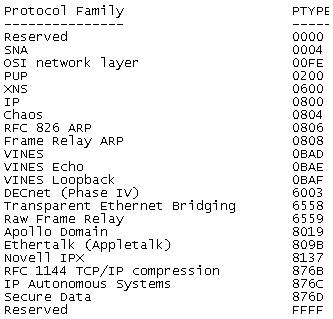
More information can be in RFC 2784 which explains the IP Packet fields in greater detail then I covered here.
Now, as far as how the configuration goes for a normal GRE tunnel goes it is fairly minimal:

However, there are a few things that can be a little rough to get the hang of at first. The first thing unlike physical interface you can declare tunnel interfaces from configuration mode and you can start at any number. Now like any other interface you will want to assign your tunnel its own IP address since these GRE tunnels operate around layer 3 they will need IP addresses on the same subnet so both tunnel interfaces can communicate. The only other requirements for configuring a GRE tunnel is specifying the tunnel source and the tunnel destination. The tunnel source can be a physical interface or an IP address just keep in mind the tunnel source needs to be local on the router. The tunnel destination is going to the address of the remote router you are terminating the tunnel to. You will want to make sure the tunnel source and tunnel destination configured have connectivity to each other since it is between these addresses the GRE tunnel will run over.
There you go, GRE in a nutshell!
Let’s look at: 802.11 Beacon Frames.
Probably the most common 802.11 management frame is the beacon frame. This frame is broadcasted from the AP listing the capabilities of the WLAN, but what exactly is listed? Let’s take a quick look.

Beacon frame from a Cisco WLAN
Here we can easily make out some of the capabilities of the WLAN, for example the SSID is probably going to be the first thing you notice TestSSID in this case, this is what provides the name of the WLAN. As you know SSID broadcasting can be disabled (Also called Closed System) at which point the SSID field will be blank.
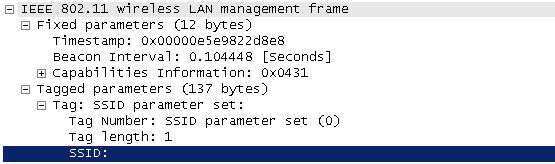
Beacon frame with SSID broadcasting disabled. The SSID Information is simply excluded from the Beacon frame.
Next we will take a look at the what data rates are supported by this WLAN:
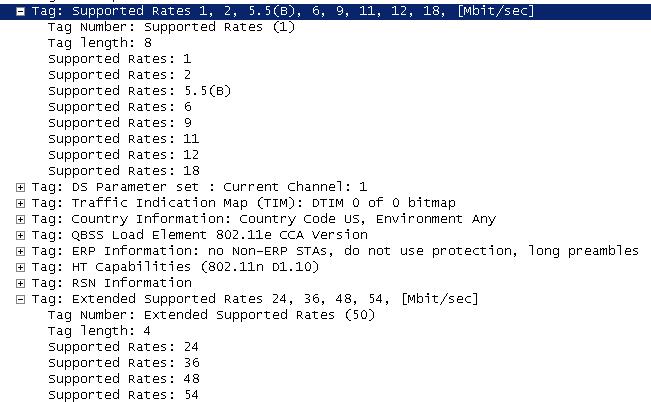
Here you can see the a few supported data rates and the extended supported data rates. This tells us the WLAN is capable of supporting both 802.11b and 802.11g WLAN clients. You’ll notice the Data rate of 5.5 has a (B) next to it, it just so happens 5.5 is set a mandatory data for this WLAN, so if a WLAN client can not support a data rate of 5.5 it will not be able to successfully authenticate and associate to the WLAN.
Next up we are going to at the RSN (Robust Security Network) information for this WLAN.
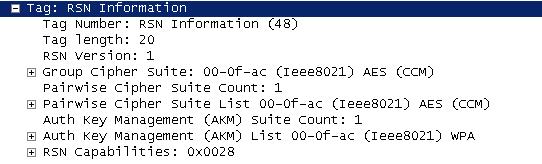
As you can see from the RSN Information element (IE), this WLAN is 802.11i compliant, showing it’s capable of AES/CCMP which means your WLAN clients will need to support 802.11i/WPA2 with AES in order to successfully communicate with this WLAN.
A few other noticeable features we can find in this beacon frame is the WLAN supports High-Throughput (HT), which is 802.11n (Draft 1 in this case). So this is an 802.11b/b/n WLAN in the 2.4 GHz RF range.
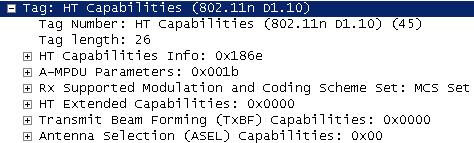
This access point did not have multiple antennas attached to it, which is why the TxBF and ASEL capabilities are currently at 0x0000 and 0x00.
You will also notice in the 6th line down that the WLAN is 802.11e compliant meaning some QoS will be performed, and the line after that states: no non-ERP STA’s, do not use protection this states no 802.11b clients are currently connected only 802.11g WLAN clients are currently connected to this WLAN so protection mechanism’s are not in use.

Now, at the end of the beacon frame you will notice all this Unknown information, as you have probably guessed (or read) this information is vendor specific, which is common for every vendor to have put their own proprietary information within the Beacon frames. The main thing is make sure this extra information does not create its own incompatible issues with older WLAN client devices.
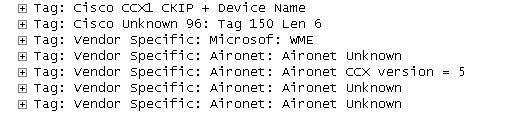
So in conclusion there’s a basic Cisco WLAN beacon frame, it should be a mirror image of the configuration for your WLAN. Looking at the beacon is just a simple way to make sure the WLAN is doing what’s it’s configured to do.

 CCIE or Null!